ChatGPT 圖片編輯指令總整理:30+ 個修圖範例
依照修圖目的選擇 ChatGPT 指令
先寫要得到的結果,再鎖定不能改變的部分。有效的修圖指令會指定一項修改、列出要保留的臉部或產品細節,並說明圖片用途。
| 修圖目的 | 必須保留 | 建議流程 |
| 更換背景 | 臉部或產品、邊緣、鏡頭角度、光線方向 | 背景更換提示詞 |
| 讓照片清晰 | 既有臉部細節、標誌、標籤與文字,不憑空補資料 | 先做小幅清晰化,再與原圖比較 |
| 正面人像修圖 | 本人身分、臉型、膚質、表情、髮際線 | 圖片編輯工作流程 |
| 護照或證件照 | 所有身分特徵,只能做技術校正 | 證件照編輯與官方規格檢查 |
| 產品圖片 | 形狀、標誌、標籤、顏色、材質、比例 | 先建立中性產品母版,再更換廣告場景 |
通用指令公式
編輯上傳的圖片,只修改[一項具體內容]。
完整保留[本人/產品/標誌/標籤/顏色/材質/鏡頭角度]。
使用[背景、光線、陰影、長寬比],用途是[最終用途]。
不要增加文字、額外人物或重新設計受保護的部分。
先看重點:修圖指令要寫清楚什麼
最穩的 ChatGPT 圖片編輯提示詞,要同時寫清楚改哪裡、保留什麼、目標背景或風格是什麼、最終圖片用在哪裡。這樣 AI 更像是在做可控修圖,而不是重新生成一張相似圖片。
| 修圖任務 | 必須保留 | 可複製指令 |
| 換背景 | 人物/產品、邊緣、光線方向 | 只替換背景為乾淨棚拍場景,主體保持不變。 |
| 產品圖 | logo、標籤、顏色、材質、比例 | 做成適合電商主圖的乾淨產品圖,保留真實陰影。 |
| 人像精修 | 身分、臉型、皮膚紋理、表情 | 優化光線並清理干擾物,但人物保持自然真實。 |
相關工作流:換背景需求看 ChatGPT 換背景提示詞,精準修圖看 圖片編輯指令寫法,實際生成可使用 GPT Image 2。
更新於 2026 年 7 月 14 日
如果你正在找可以直接複製使用的 ChatGPT 圖片編輯提示詞,這篇 2026 更新版可以直接當作提示詞庫。 這裡涵蓋 AI 圖片編輯、GPT Image 2 提示詞、換背景、人像精修、電商產品圖、燈光修復、物件移除和創意風格轉換。
ChatGPT 和 GPT Image 2 已經可以理解自然語言修圖命令。你不一定要開啟複雜的修圖軟體,只需要上傳圖片,說明想改哪裡、保留什麼、最終用途是什麼,就能得到更乾淨、更適合發布的版本。關鍵不是簡單說「讓它更好看」,而是清楚寫出主體、編輯區域、風格、光線、使用場景和必須保留的細節。
快速總結:把這篇文章當作 AI photo editor prompt 庫使用。先明確修圖任務,再說明不應改變的部分,然後用 iMini 的 GPT Image 2 工具測試換背景、人像精修、產品圖清理、社群配圖和創意改圖。
先從下方找到對應場景,再把主體、修改範圍與用途換成自己的需求。只需要一條短指令時,可使用圖片指令入口。
如果你想先看完整修圖流程:可以先讀 ChatGPT Photo Editor 使用教學。本篇主要作為可複製的提示詞合集使用。
- 重點關鍵字:ChatGPT 圖片編輯提示詞、AI 修圖提示詞、GPT Image 2 prompts、換背景 prompt、人像精修提示詞。
- 推薦流程:上傳圖片,貼上一條提示詞,查看結果,再一次只微調一個細節。
- 相關教學:GPT Image 2 vs GPT Image 1 對比。
2026 年 ChatGPT 圖片編輯如何運作?
要使用 ChatGPT 編輯圖片,只需上傳照片,並以自然語言描述你希望進行的變更。ChatGPT 能理解詳細的文字提示,並智慧解讀你的指令,進而生成更新後的圖片版本。
為了獲得最佳效果,請使用清晰且具體的提示詞。務必包含關鍵細節,例如主題、視覺風格、光線、需要編輯的區域、背景或環境,以及你希望新增、移除或優化的元素。避免使用「讓它更好看」這類模糊的指令,精確的描述才能讓 AI 生成更符合你預期的結果。以下我們整理了實用的 ChatGPT 圖片編輯提示詞供你參考。
30+ 個可複製的 ChatGPT 圖片編輯提示詞
以時間為基礎的圖片編輯
以時間為基礎的圖片編輯提示詞遠不只是基本的濾鏡調整。它們需要 AI 隨著時間推移,真實地重新評估光線條件、表面材質、天氣效果及環境變化。這類提示詞特別適合用於季節性行銷活動、敘事插圖,以及能傳達生存、孤立或蛻變等強烈情感的視覺作品。豐富的原始素材為 AI 提供了堅實的視覺基礎,使其能精準模擬時間流逝對場景的影響。
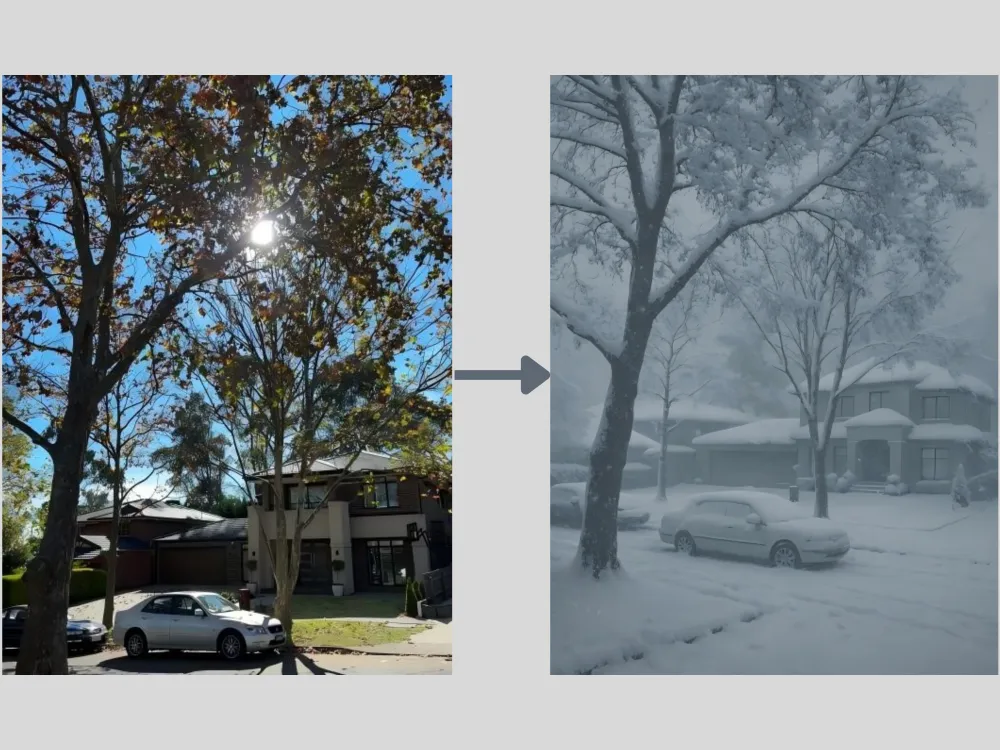
Season Change Prompt: "Transform this sunny summer street scene into a deep winter blizzard. Add heavy, realistic snow accumulation on the rooftops, cars, and tree branches. The atmosphere should be overcast, cold, and foggy, with snowflakes actively falling.
免費產生試試→
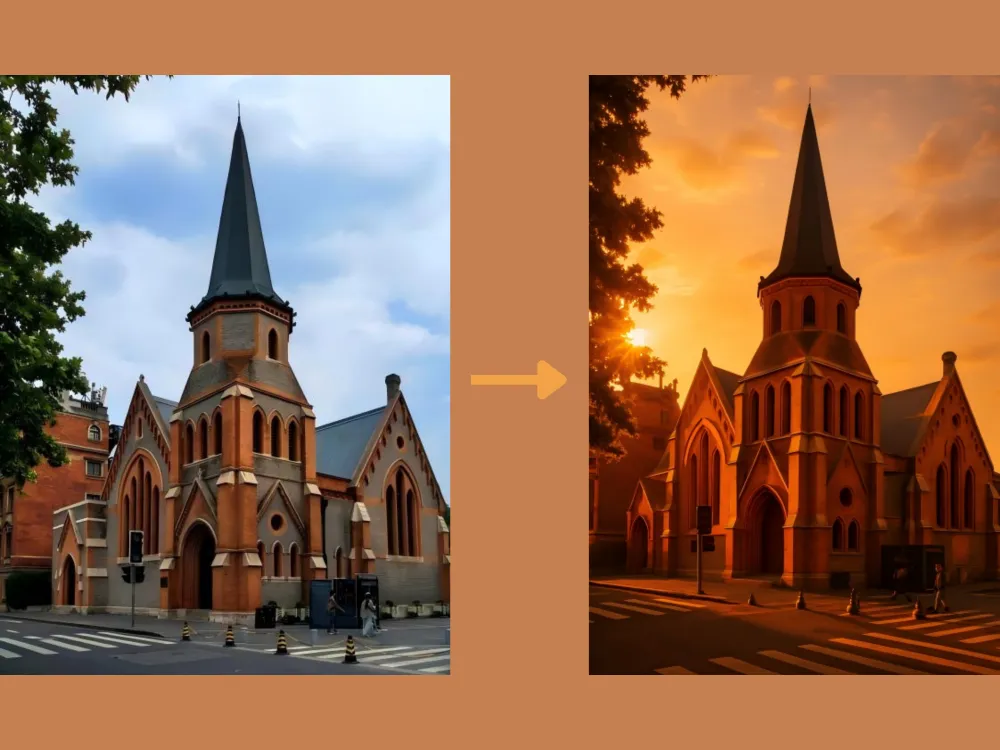
Golden Hour Relighting Prompt: "Completely re-light this image to take place during 'golden hour' sunset. The light source should come from the back-left, creating long, dramatic shadows and adding warm, rim lighting to the edges of the main subjects and buildings."
免費產生試試→
風格轉換
風格轉換是指分析並重現參考圖像的藝術特質。AI 會解讀筆觸紋理、色彩和諧、視覺節奏及構圖美學等元素。透過 ChatGPT,你可以將照片轉換為各種風格,包括動漫、復古、遊戲及其他多種創意風格,同時保留原始主體。為獲得最佳效果,建議上傳風景圖片或人物、角色的清晰生活照。
Photo to Ghibli Prompt: "Redraw this photograph in the beautiful hand-painted anime style of Studio Ghibli. Focus on soft watercolors, lush clouds, gentle color palettes, and a sense of nostalgic warmth, while keeping all original elements prominent."
免費產生試試→
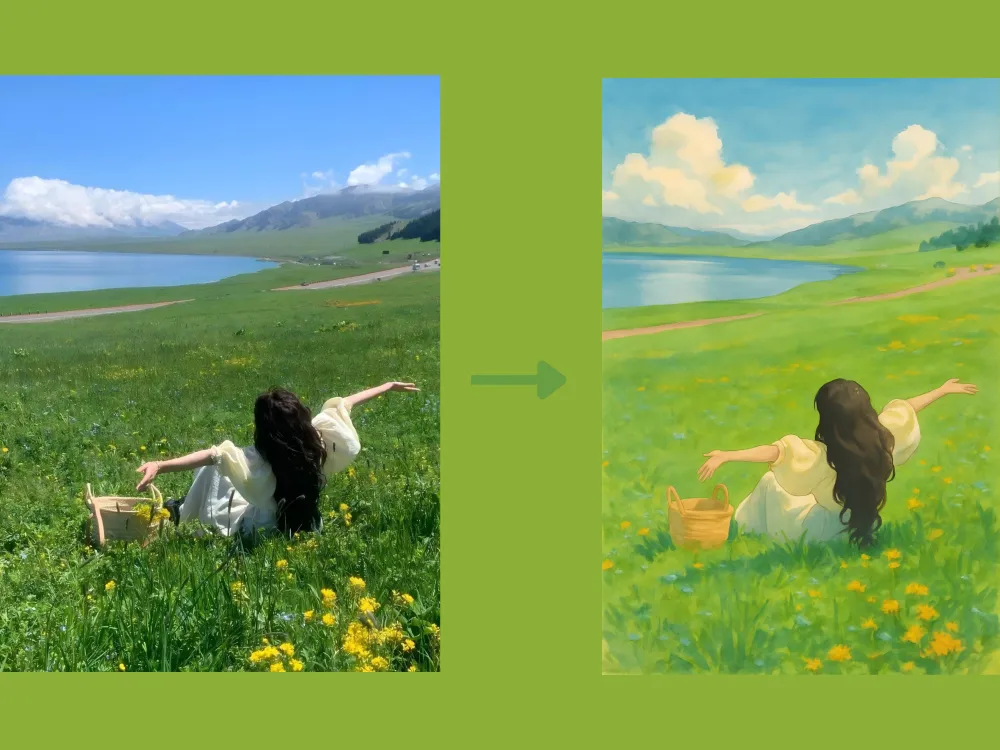
Photo to Oil Painting Prompt: "Transform this portrait into a 17th-century Dutch Golden Age oil painting. Apply rich, deep colors, dramatic chiaroscuro lighting, and visible, textured brushstrokes across the entire canvas."
免費產生試試→
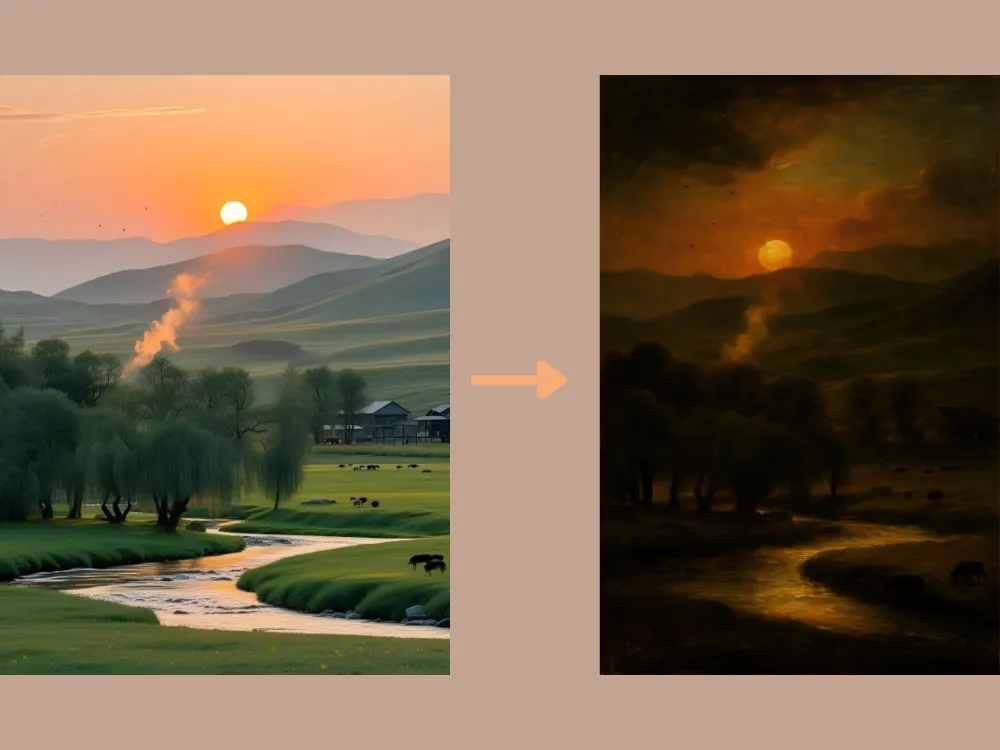
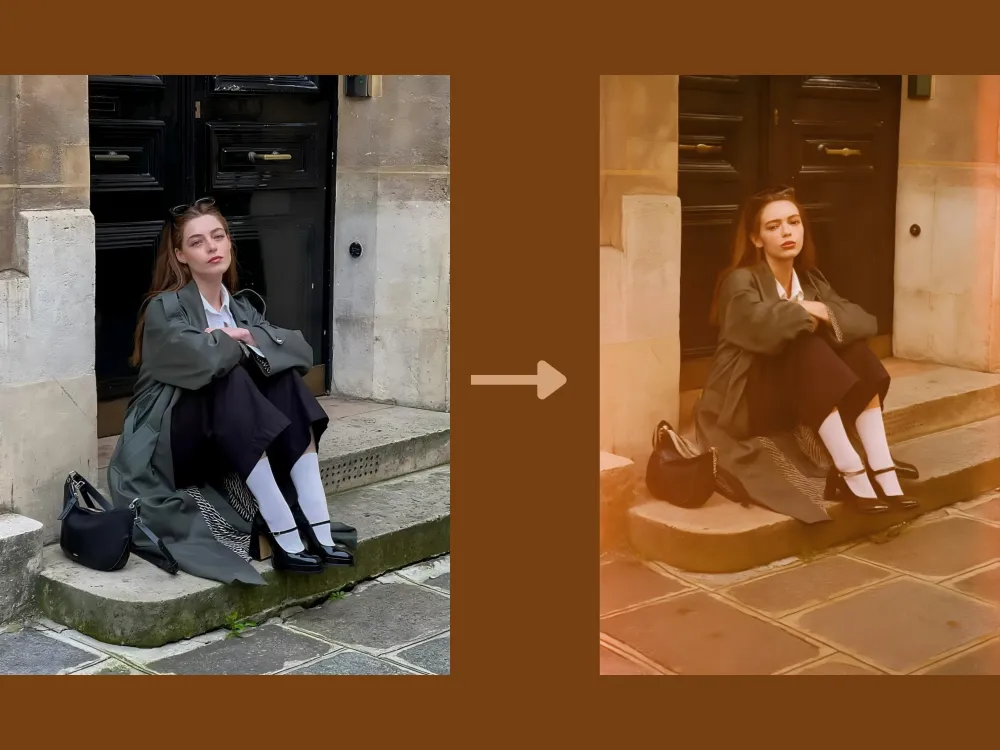
Photo to Film Simulation Prompt: "Give this image an authentic 1970s Kodak film look. Introduce realistic film grain, slight color bleeding, faded warm tones, and subtle light leaks along the edges of the frame."
免費產生試試→
Cartoon to Realistic Prompt: "Transform this cartoon image into a high-realism photographic style. Accurately preserve the main character's defining features, color scheme, and personality, while converting them into lifelike human proportions, textures, and lighting. Apply natural skin tones with subtle imperfections, realistic fabric materials with visible weave and folds, finely detailed hair strands, and soft, directional shadows to achieve a photo-realistic appearance. Maintain the original pose, facial expression, and overall composition so the character remains instantly recognizable."
免費產生試試→
基礎圖片編輯
你也可以使用 ChatGPT 進行基礎的 AI 圖片編輯,包括相片增強、色彩平衡、物件移除及顏色更換。以下這些 ChatGPT 提示詞能協助分析你的照片,並自動套用最佳化調整,讓圖片整體看起來更清晰、更明亮、更均衡。
Extraction Prompt: "Extract the main object from the image and remove the background completely. Preserve the object's original shape, colors, and details with clean, precise edges. Output the object on a transparent background."
免費產生試試→
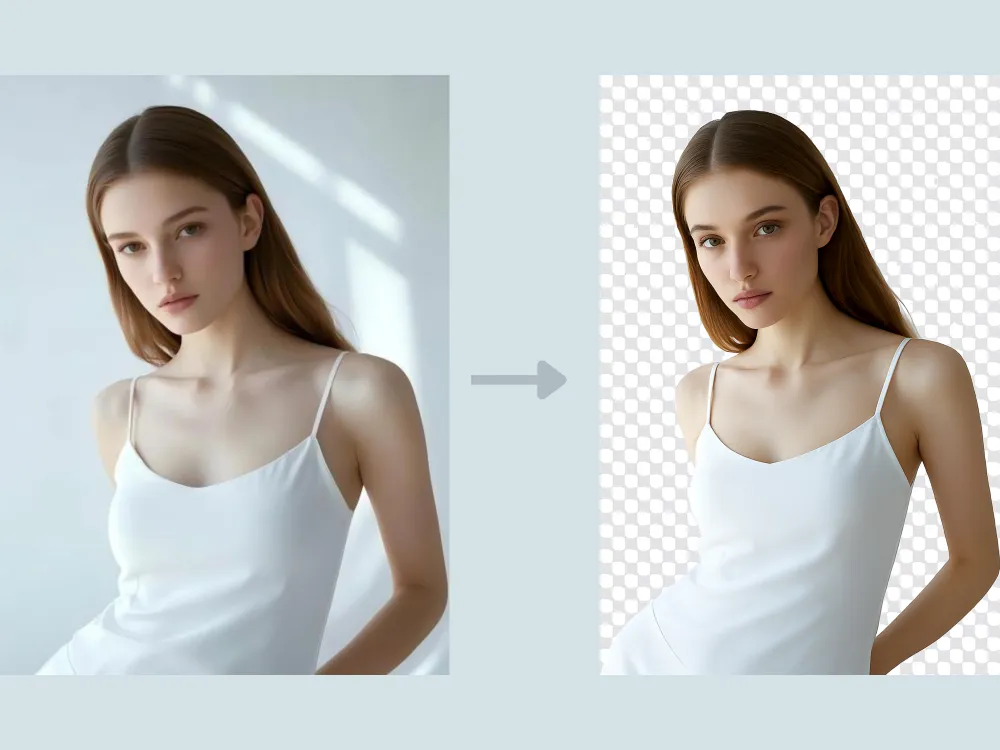
Image Color Change Prompt: "Change the color of [specific object or area] to [new color] while preserving the original texture, material properties, and surface details. Ensure the new color interacts naturally with existing lighting, shadows, and reflections so it appears physically accurate and well integrated with the scene. Keep the image in high resolution and leave all other elements unchanged."
免費產生試試→
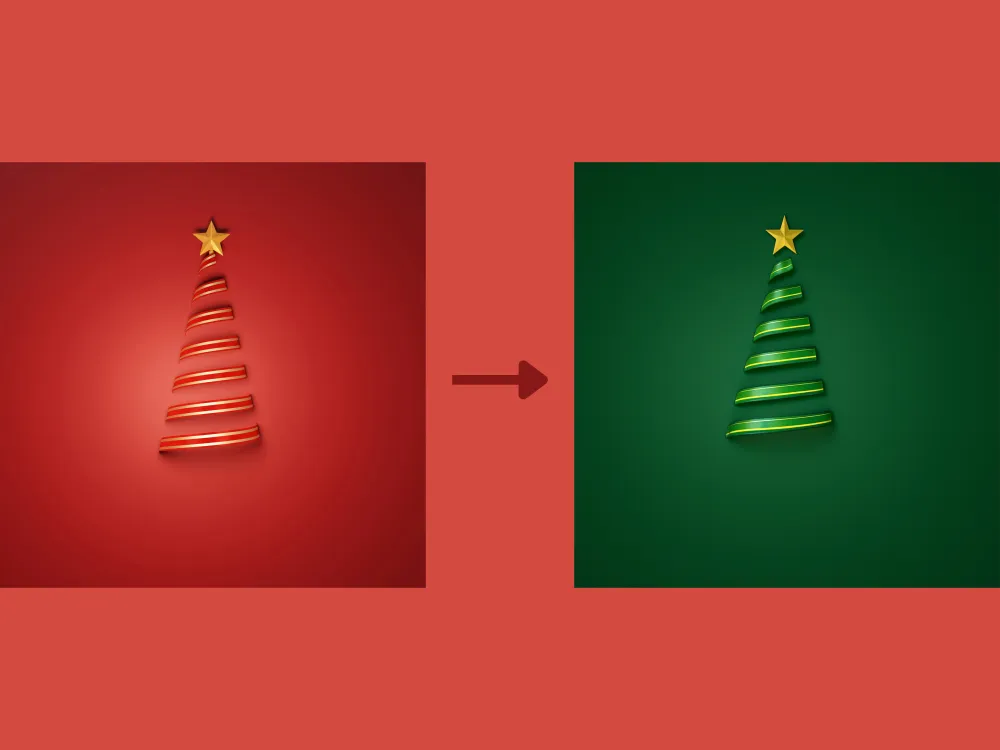
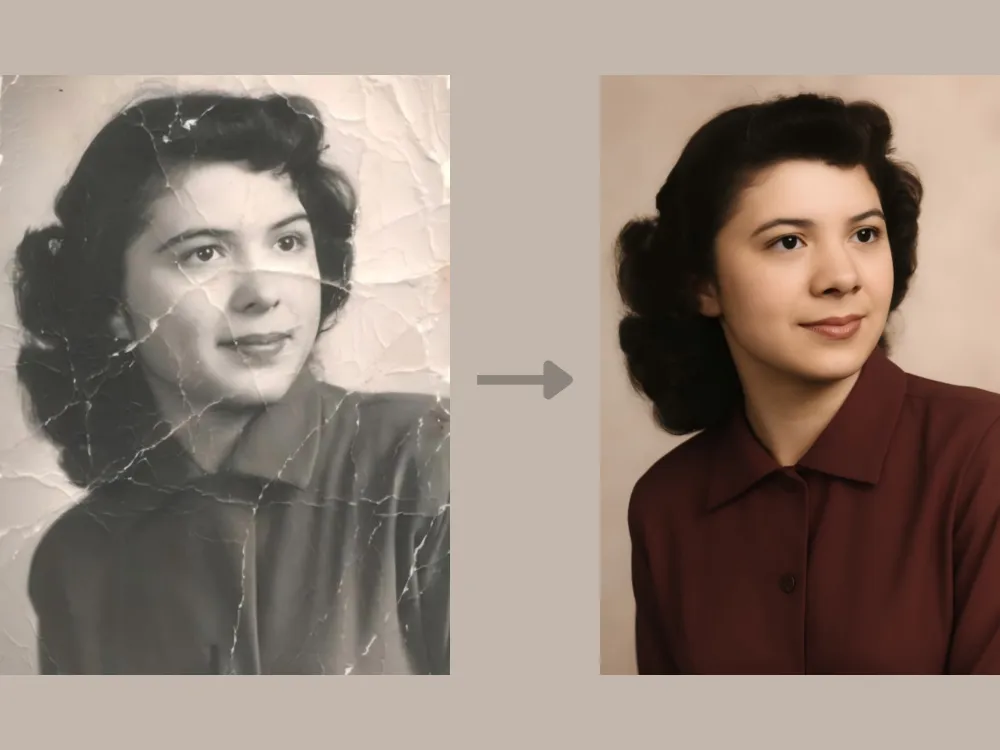
Photo Restoration Prompt: "Restore this damaged vintage photo. Repair all tears and creases, remove sepia tones to reveal realistic colors, and reconstruct the missing parts of the people's faces surrounding the torn edges."
免費產生試試→
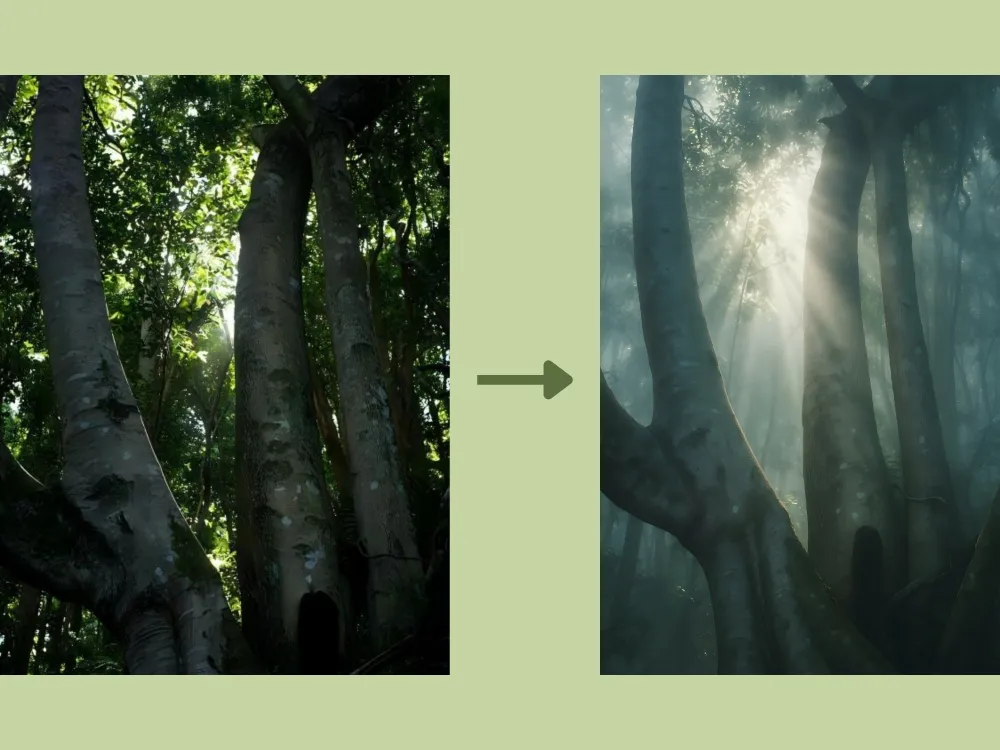
Atmospheric Change Prompt: "Introduce a thick, mystical morning fog into the forest background. Add visible volumetric light rays (God rays) filtering through the tree canopy to create depth and mood."
免費產生試試→
創意外擴繪製
外擴繪製(Outpainting)能在原始圖片邊界之外生成新內容,同時無縫融合原始風格、色彩、光線與透視。使用正確的 ChatGPT 提示詞,你可以自然地延伸場景,將近景人像轉化為完整的環境場景,或將簡單風景擴展為寬廣、沉浸式的全景,呈現出渾然一體的視覺感受。
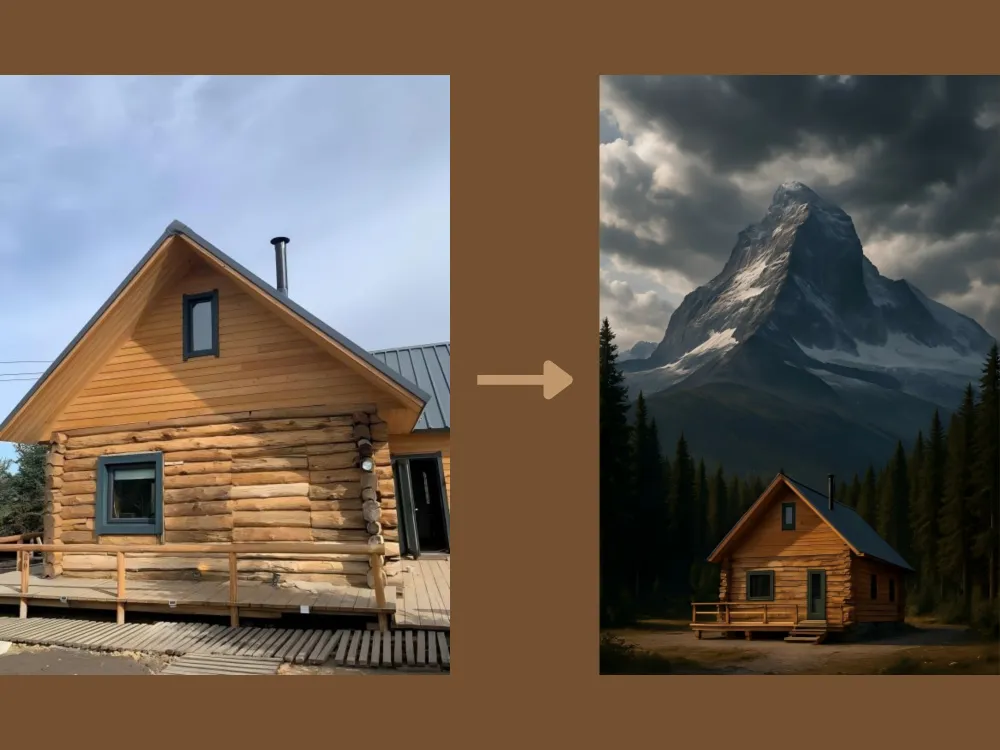
Scene Extension Prompt: "Zoom out completely. The original image of the cabin should now be a small part of a vast, towering mountain landscape surrounded by a dense, ancient pine forest under a dramatic sky."
免費產生試試→
人像編輯
ChatGPT 的 AI 圖像工具同樣支援進階人像編輯。它能智慧偵測臉部特徵,如肌膚、眼睛、髮型及背景元素,再進行精準的局部優化。這些功能包括臉部修飾、虛擬妝容與髮型試穿,以及自然的肌膚平滑處理,同時保留人物的真實樣貌與細節。
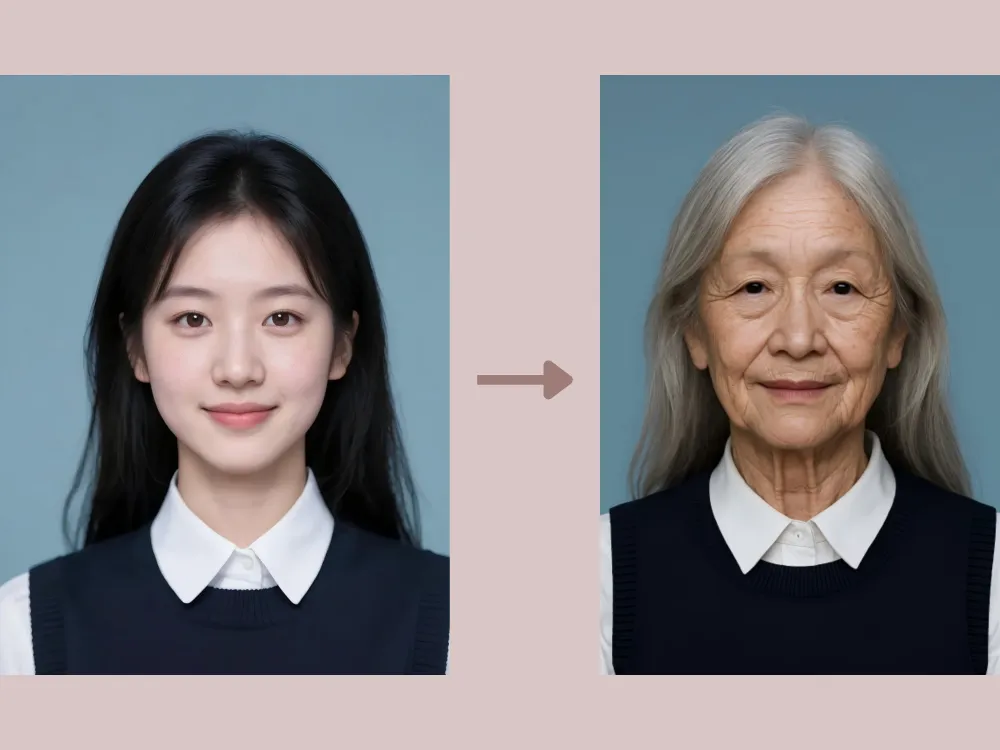
Age Progression Prompt: "Age the person in this portrait by about 40 years. Add realistic wrinkles around the eyes and mouth, thin out the hair and turn it silver, and introduce age spots, while keeping the person's original bone structure and identity recognizable."
免費產生試試→
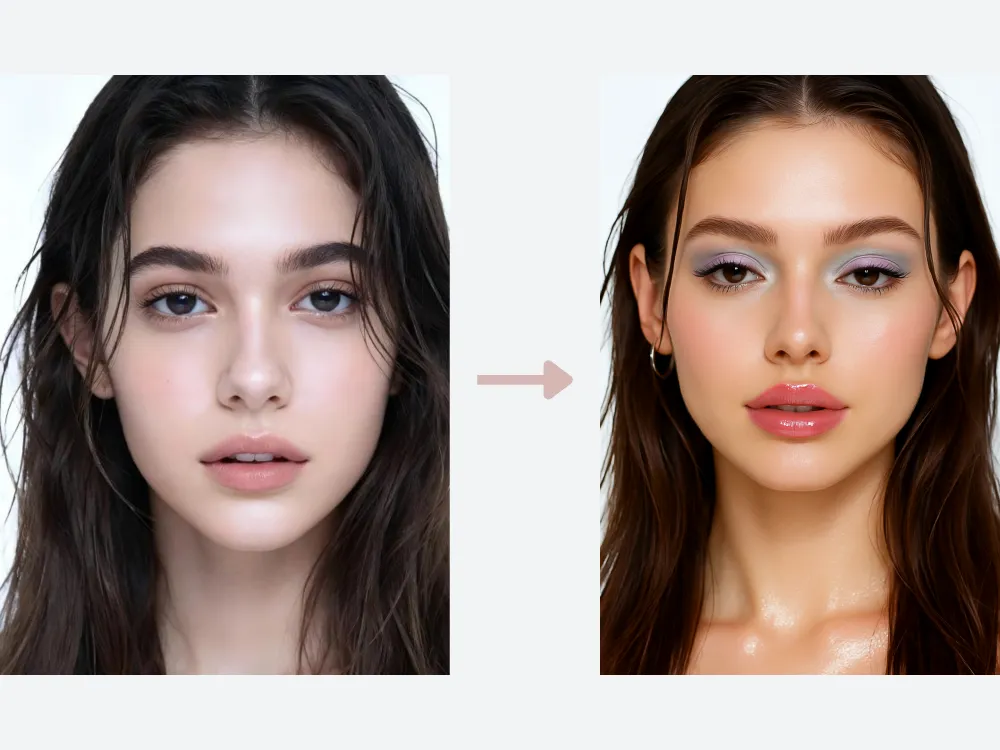
Y2K Makeup Try-on Prompt: "Apply a Y2K-inspired makeup look. Add glossy, high-shine lips with soft pink or nude tones, lightly frosted or pastel eyeshadow, thin arched eyebrows, subtle shimmer on the eyelids and cheekbones, and softly defined lashes. Keep the skin smooth, luminous, and natural-looking. Preserve the subject's facial features, expression, and lighting while maintaining a playful, early-2000s aesthetic without over-editing.
免費產生試試→
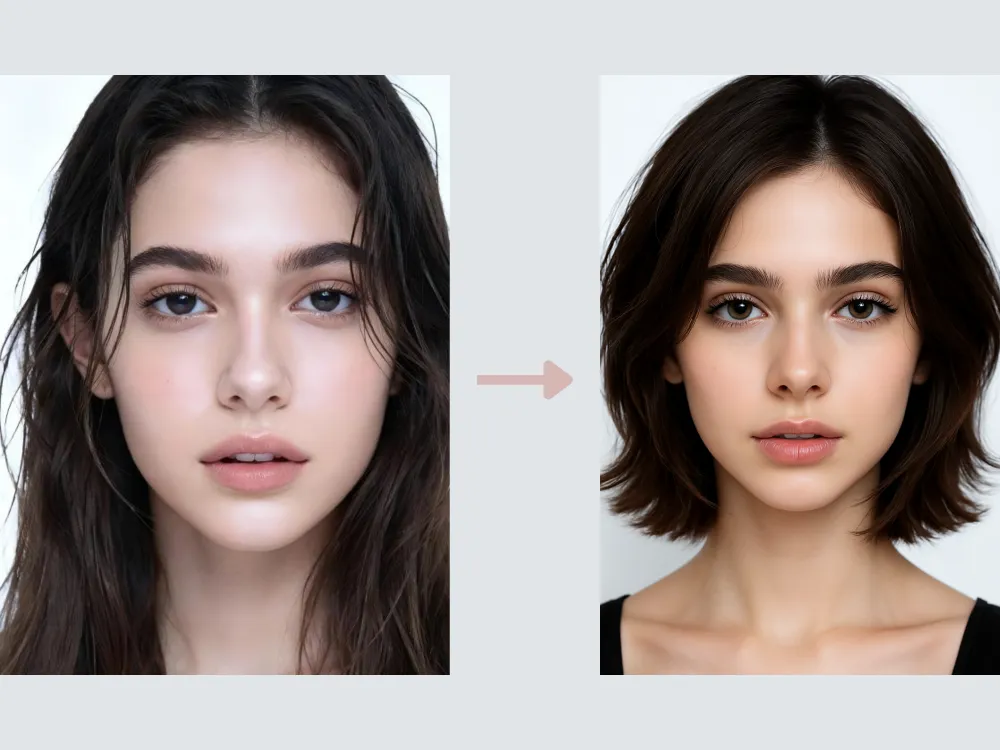
Hairstyle Change Prompt: "Change the hairstyle to a layered bob. Preserve the subject's facial features and natural hair texture, keeping realistic volume, strand details, and soft shadows. Ensure the layers flow naturally around the face, maintain proper lighting and highlights, and retain a polished, lifelike appearance. The final result should look seamless and fully integrated with the original image."
免費產生試試→
動物編輯
AI 動物編輯遠不止於簡單的濾鏡和色彩調整。ChatGPT 可以強化、修飾,甚至重新詮釋你的寵物或野生動物照片。
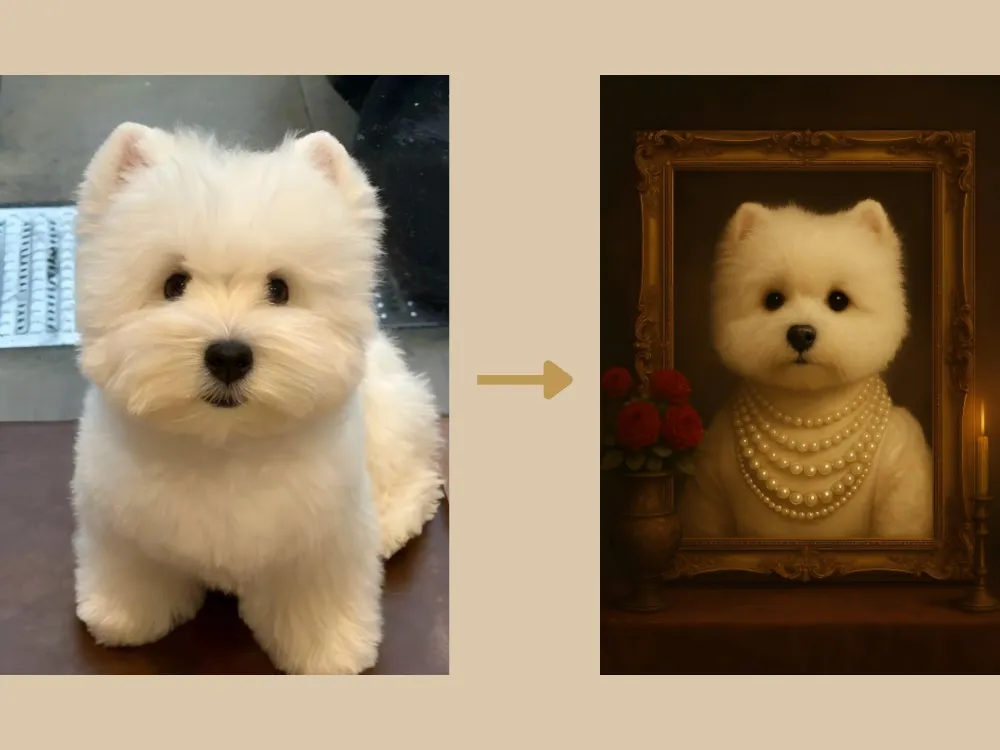
Vintage Pet Prompt: "Adorn the pet in the original image with an elaborate 18th-century noblewoman's pearl necklace. Set the background in a lavish, candlelight-lit portrait studio, while maintaining the pet's realistic fur texture and expression. Position a vintage ornate picture frame centrally, with the pet inside it. On the left side of the frame, place an exquisite vintage vase holding a bouquet of red roses. The overall style should be a retro pet portrait."
免費產生試試→
Cute Pet Prompt: "Maintain the current appearance and face of the pet, rendering a realistic cat. Place the cat in an outdoor scene on sunlit grass, wearing a collar made of flowers and greenery, and surrounded by yellow, green, and white fresh flowers. The overall image should be fresh and vibrant. An oil painting stands upright behind the cat, featuring the same cat against the identical grass and flower background."
免費產生試試→
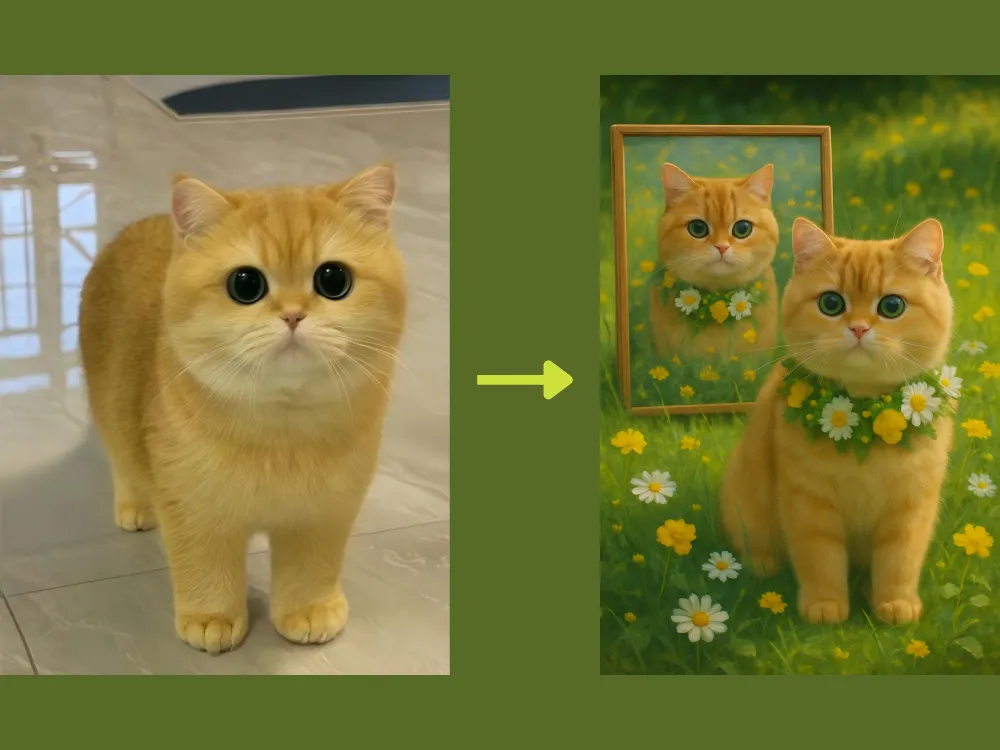
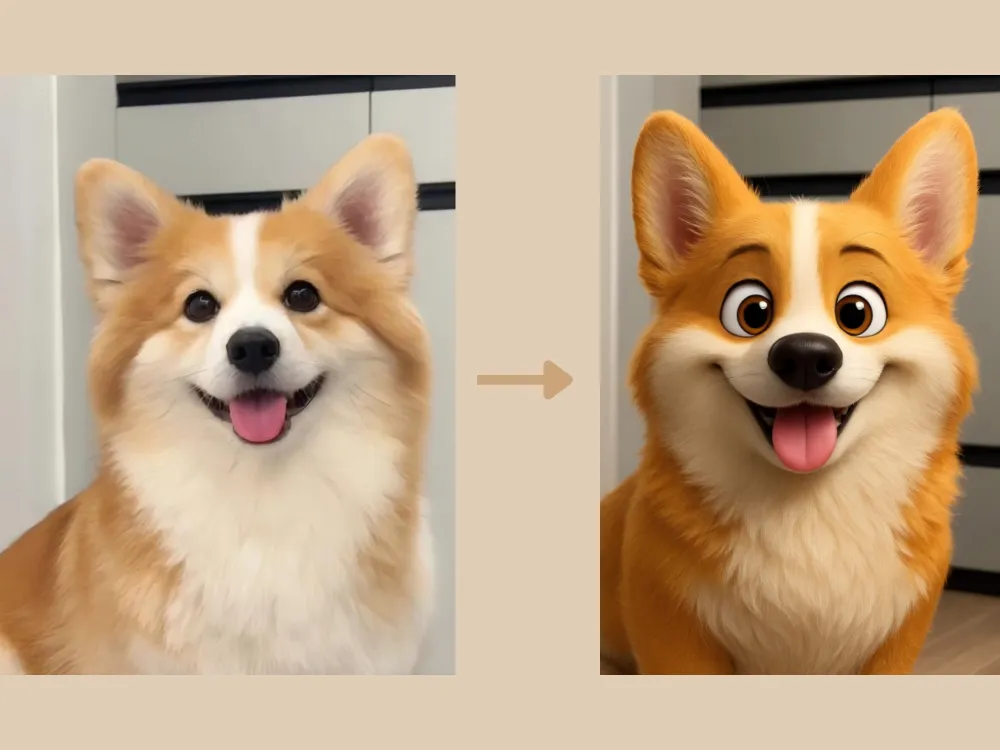
Photo to 3D Prompt: "Transform the pet in the original image into an ultra-detailed 3D cartoon style, similar to an IP character/mascot. Ensure the realistic texture of the fur is maintained, and pay close attention to preserving the pet's detailed facial features from the original image."
免費產生試試→
GPT Image 2 修圖提示詞:讓修改更有方向
寫修圖指令時,先說明要改哪裡,再列出不能改變的細節與圖片用途。這些範例可用於整理編輯需求,但仍須對照原圖檢查結果;模型不保證完整保留每個細節。
GPT Image 2 指令範例
照片整理:「請整理這張照片的光線與色彩,移除小型干擾物。保留主體、姿勢、人物五官、拍攝角度與構圖,讓畫面自然,不要重新設計主體。」
社群配圖:「請將這張照片調整為社群貼文配圖。保留主體,適度提高對比與色彩,簡化背景,並預留乾淨的標題空間。不要在圖片內生成文字。」
部落格縮圖:「請將這張照片調整為清楚的部落格縮圖。保留可辨識的主體,簡化背景、改善光線,並在一側預留文字空間。不要直接生成文字。」
ChatGPT 換背景提示詞
換背景時,請交代新場景、光線方向、景深與陰影,並明確指定不能改動的部分。更詳細的步驟可參考換背景指令指南。
可複製的換背景指令
攝影棚背景:「請將背景換成乾淨的中性攝影棚。保留主體、髮絲邊緣與衣物細節,讓光線方向與柔和陰影自然一致。」
生活情境背景:「請將背景換成明亮的現代工作空間,使用柔和自然光。不要改變人物五官、姿勢與衣服,讓人物光線與新空間協調。」
商品背景:「請將背景換成簡潔的商品展示場景。保留商品形狀、標籤、顏色與材質,加入自然的接地陰影與整潔檯面。」
人像精修提示詞
人像修圖以小幅調整為主。明確保留本人特徵、膚質、臉型與表情,避免修成另一個人。
可複製的人像修圖指令
自然精修:「請自然修飾這張人像,保留人物五官、臉型、表情與皮膚紋理。減少小瑕疵、柔化過重的陰影,讓畫面更清楚,但不要磨皮過度。」
專業頭像:「請將這張人像整理為專業頭像。保留本人特徵,改善光線、簡化背景,適度增加臉部清晰度,適合用於 LinkedIn 或團隊介紹頁。」
創意人像:「請將照片調整為電影感雜誌人像。保留同一人物的五官、姿勢與表情,加入柔和的戲劇性光線及較深背景,不要改變臉部結構。」
電商商品圖提示詞
商品圖的準確度比場景華麗更重要。明確保留外形、標籤、顏色、材質與比例,再調整周圍環境。
可複製的商品圖指令
商品圖整理:「請整理這張商品照,移除背景雜物、改善光線,換成乾淨的白色或淺灰色背景。保留商品外形、標籤、顏色與材質,加入柔和自然的陰影。完成後仍須確認刊登平台規格。」
生活情境商品圖:「請以這張商品照製作簡約的生活情境圖。保留標籤、外形與顏色,使用柔和自然光,預留廣告文案空間,不要增加不存在的功能或配件。」
廣告素材:「請將商品照調整為社群廣告素材。保留商品資訊,加入符合品牌風格的簡潔背景,適度提高對比,並預留標題空間。不要生成文字。」
讓 ChatGPT 修圖更接近預期的做法
- 指定一項任務:例如換背景、調整光線、移除物件或整理商品照。
- 列出保留項目:例如五官、商品標籤、姿勢、衣物與拍攝角度。
- 交代用途:頭像、電商商品圖、部落格縮圖或社群廣告。
- 把要求寫具體:直接描述光線、背景、色彩與構圖,不只說「更好看」。
- 一次修一個問題:先對照原圖,再針對一個細節修改;反覆失真時,改用原圖圖層編輯。
常見問題:ChatGPT 圖片編輯指令
ChatGPT 修圖指令怎麼寫比較清楚?
寫明任務、修改範圍、必須保留的細節與成品用途。例如:「只將背景換成乾淨攝影棚,保留主體與髮絲邊緣,讓光線自然一致。」
ChatGPT 可以替照片換背景嗎?
可以用支援圖片編輯的流程上傳照片並描述新背景。結果仍需檢查,尤其是五官、產品標籤與輪廓。可在iMini 圖片編輯入口試作。
GPT Image 2 提示詞要包含什麼?
包含任務、主體、保留區域、光線、背景與用途,並說明不應出現的內容。不要只描述風格。
修圖時,要直接讓 AI 生成文案嗎?
需要精確文字或多語版本時,先預留文字空間,再到排版工具加上定稿文案,較方便校對與調整。
只想快速貼上一條指令,可看任務型圖片指令;想知道從上傳到驗收怎麼做,可看完整照片編輯流程。
結語
ChatGPT 圖片編輯提示詞的應用遠不止於上述範例,它提供了強大的方式來編輯、轉換及創作各種視覺內容。若想簡化工作流程並輕鬆呈現精彩成果,不妨試試 iMini AI 中的 ChatGPT 圖像生成工具,專為讓創意圖片編輯更快速、更智慧、更易於上手而設計。